Digital Account Upgrade
UX / VISUAL DESIGN
A new digital portal that increased upgrades by 27%. This is an MVP version that will continue to scale as it's performance is tracked.
TIMELINE
4 months
MY ROLE
UX + UI Designer


THE PROBLEM
Most users aren't aware they qualify for an upgrade + Most users don't have the time to make a trip to the branch or to call in order to upgrade
How do we design a digital experience where users can upgrade easily?
CONSTRAINTS
Four month deadline + Developers have to work with existing components only
How might we create a simple upgrade application?
How might we ensure users feel safe during a digital upgrade?
How might we show the benefit of upgrading?
USER FLOWS
There were two versions of the success path to be considered and tested
I created a user flow of potential paths for this process based on the business lines' requirements. One explores the option of a landing page, the second option would have the verification step and landing page all in one page.
User flow 1
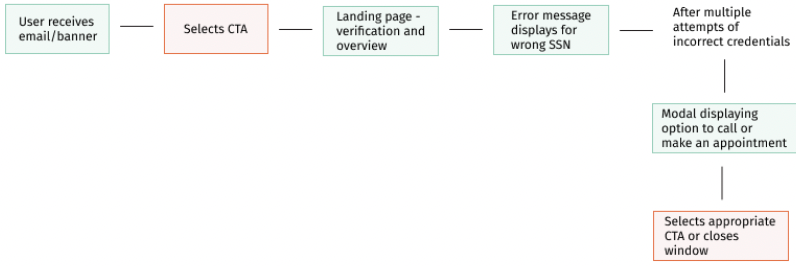
User flow 2

UXR
Usability Test Findings
I collaborated with our UX Research team to test out both landing pages and the full user flow. They conducted a moderated study with 8 participants who currently have the basic tier account. The key findings were:

Users prefer being shown the benefits before being moved to the verification step.
Most users aren't aware of the benefits of their current account. They want to compare both checking accounts.
Users wanted a way to log back in to their account once they completed the upgrade to see the change.
Users didn't understand what CitizensPlus was. The rewards program was unclear.
SOLUTION 1
Show the landing page first with a comparison view of the users' current checking account vs. the next tier account + show the rewards program benefits in one place
This was the MVP version, due to time constraints we were not able to have a table view for the comparison. It will be updated at a later time.


SOLUTION 2
Show the upgrade as a 3-step process with a progress stepper, explain SSN usage for security, and prefill the user’s invitation code
This was designed to reduce uncertainty and effort during a sensitive flow. Clear structure, transparent messaging, and prefilled data help users move forward with confidence.


SOLUTION 3
Let users log in immediately after upgrading to view their new account
Research showed that users wanted to see the result immediately. This keeps momentum after confirmation and reinforces confidence by letting them verify their upgrade right away.


Impact
The live version of the upgrade portal has been very well received by users and has increased upgrades by over 25%.
Case studies


WIREFRAMES
Hi-Fi Frames for Testing
I proceeded to mockup high-fidelity wireframes to show the two potential paths we could take for a checking account upgrade. All components used are from the CDS UI Kit.
The landing page highlights the benefits of upgrading to a Quest account and why the user qualifies.
